Record Cash Remittance

Cash remittance is used when the driver physically gives the collected COD cash to the dispatcher or finance team. The dispatcher records which COD collections were handed over, and those records move from collected to remitted.
Use this flow when the business has received the physical cash.
Open Remit Collections
Go to Dispatcher -> Remit Collections.
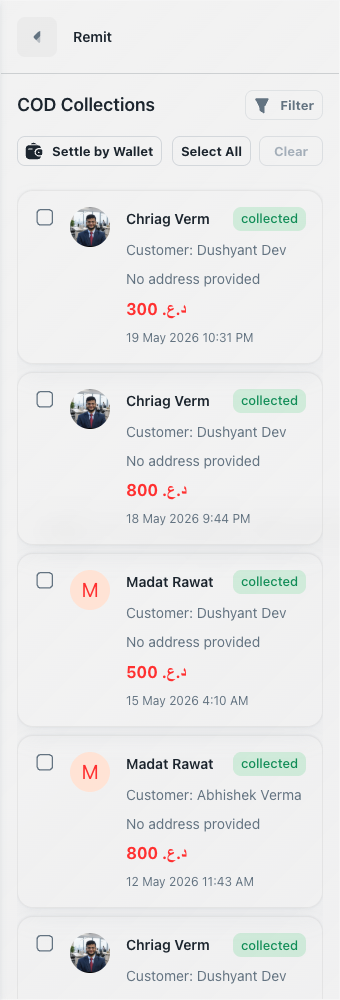
The screen lists COD collections with driver, customer, amount, collection date, and status. By default, dispatchers normally work with collected records because those are still pending.
Filter the list
Click Filter to narrow the list before selecting records.

Useful filters include:
- Status: Use
collectedwhen recording new remittance. - Date range: Match the cash handover period, such as today's shift or this week.
- Driver: Reconcile one driver's cash at a time.
- Delivery: Find a specific delivery code when investigating a mismatch.
Select COD collections
Select the COD records that match the cash being handed over. You can select individual rows or use Select All for the visible filtered list.
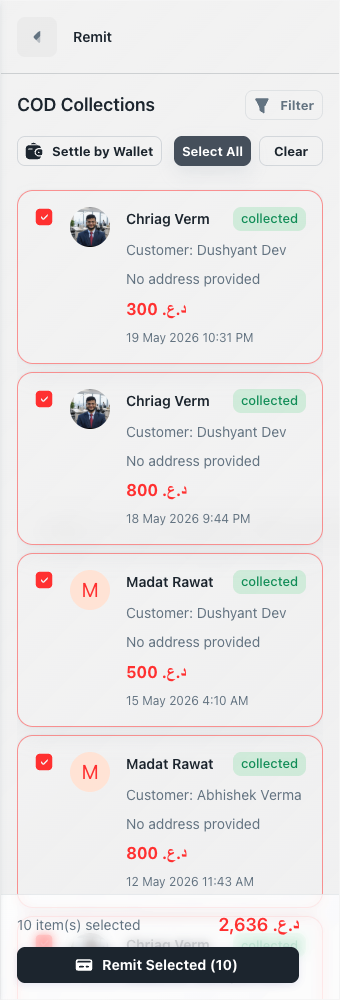
Before confirming, compare the selected total with the cash counted from the driver.
For large weekly batches, filter by driver and date first. This prevents mixing records from multiple drivers or periods.
Confirm remittance
Click Remit Selected or Remit COD, then review the confirmation dialog.
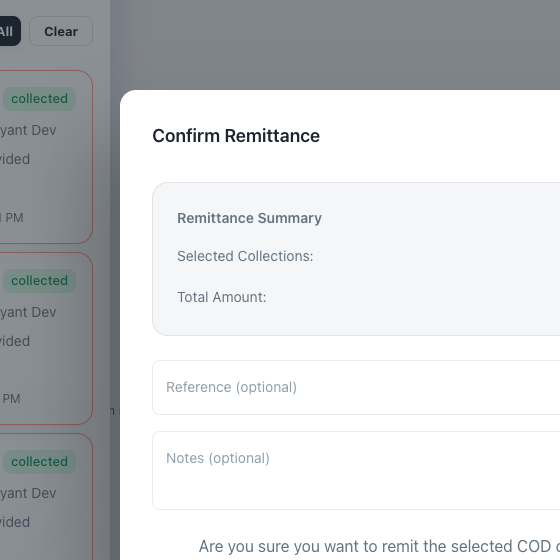
Add a reference if your team uses receipt numbers, shift IDs, cash deposit numbers, or finance batch numbers. Add notes when there was an exception, partial handover, or manual verification.
After confirmation:
- Selected records become
remitted. - The COD amount is recorded as remitted.
- The wallet ledger for the COD receiver is credited by the system.
- The selected rows are removed from the pending collected list after refresh.
What not to use this for
Do not use cash remittance when the driver is keeping the cash and paying from wallet balance. Use Settle COD by wallet for that case.
Do not mark records as remitted before cash is physically received. The system records the action as a completed financial event.
Troubleshooting
If a collection is not visible, check the status filter. Already remitted records will not appear when filtering only collected.
If the selected total does not match the cash counted, do not confirm. Check whether the driver has additional COD records from another page, date range, or driver assignment.
If remittance fails, check whether the records were already remitted or settled by wallet in another session.