Delivery Dashboard

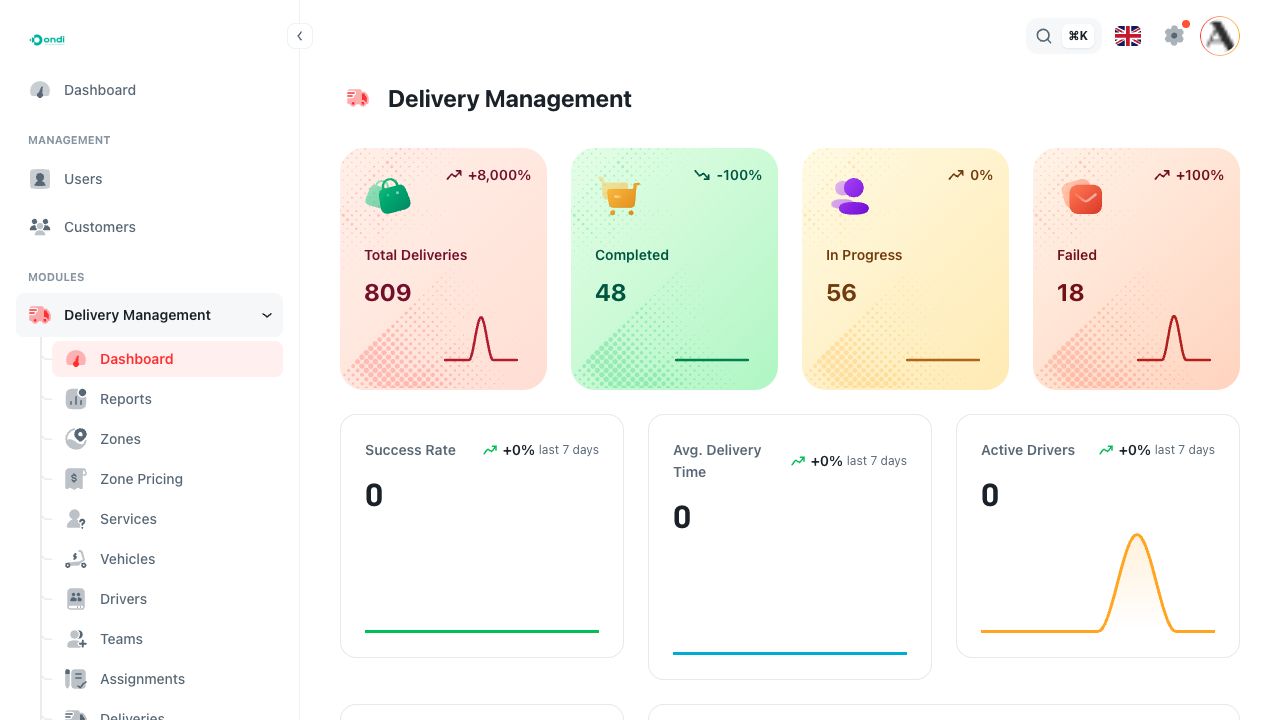
The Delivery Dashboard is the tenant admin summary page for delivery operations. It gives managers a quick view of delivery volume, completion, failures, driver performance, COD movement, recent activity, and zone performance.
Go to Delivery Management -> Dashboard.
What the page shows
The top KPI cards show Total Deliveries, Completed, In Progress, and Failed. Use these cards to understand whether the operation is growing, moving normally, or building up unresolved work.
The summary widgets show Success Rate, Avg. Delivery Time, and Active Drivers for recent activity. These help answer whether deliveries are being completed efficiently and whether enough drivers are active.
The Delivery Status chart breaks current deliveries into completed, in progress, pending, and failed states. Use it when checking the health of the current workload.
The Delivery Performance chart compares completed and failed deliveries over time. It is useful for spotting delivery quality changes during the week.
The Performance Metrics section shows success rate, on-time delivery, customer satisfaction, and first-attempt success. These are operational quality indicators, not setup controls.
The COD Summary shows cash-on-delivery collected, remitted, outstanding, and settled by wallet. Use it with driver wallet and remittance workflows when checking money movement.
The Top Drivers table ranks drivers by completed deliveries, failed deliveries, average time, and rating. This is useful for performance review and coaching.
The Recent Activity timeline shows the latest delivery updates. Use it to quickly understand what just changed without opening every delivery.
The Deliveries by Zone chart shows which zones are handling the most delivery work. Use it when reviewing zone demand, coverage, and staffing.
Empty or preparing states
If Ondi does not have enough delivery data yet, the dashboard can show an empty or preparing state. This usually means the tenant needs more operational activity before the metrics can be calculated.