Assignments

Assignments tell Ondi who is responsible for a delivery and when that delivery is expected to be picked up and completed. Use this page when tenant admins need to audit driver ownership, check assignment status, or manually create an assignment for a pending delivery.
Go to Delivery Management -> Assignments.
This page documents the tenant admin assignment view. Dispatchers can also work with assignments from the dispatcher experience, where operational dispatch tools can include more live routing, driver availability, and order-handling options.
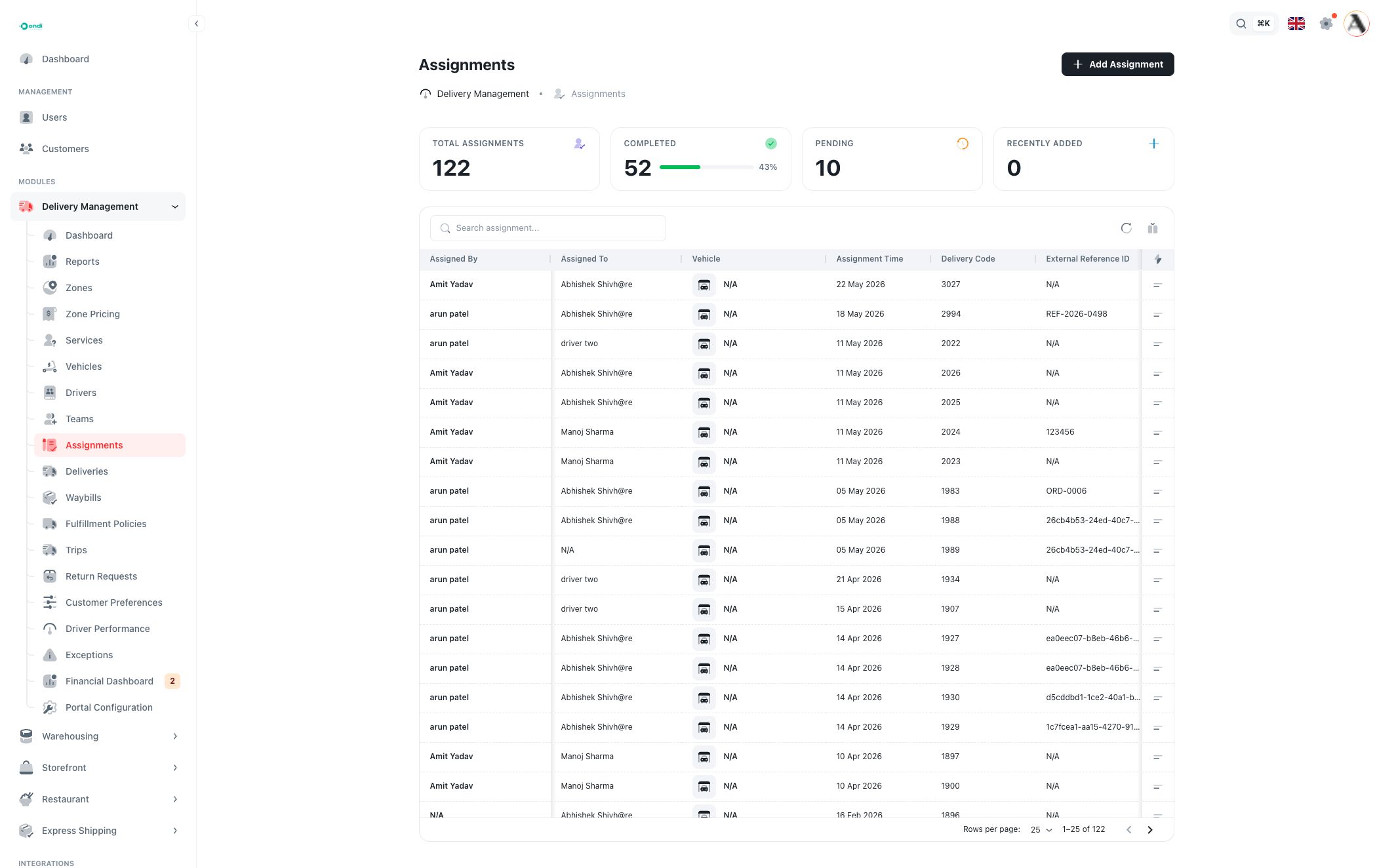
Assignment list
The top cards summarize the current assignment workload:
- Total Assignments: all assignment records for the tenant.
- Completed: assignments that finished successfully, with a completion percentage.
- Pending: assignments still waiting for driver acceptance or action.
- Recently Added: new assignment records created recently.
Use the table to review assignment details:
- Assigned By: the admin, dispatcher, or user who created the assignment.
- Assigned To: the driver responsible for the delivery.
- Vehicle: the vehicle connected to the selected driver. If no vehicle is available, Ondi shows N/A.
- Assignment Time: when the assignment was created or scheduled.
- Delivery Code: the delivery linked to the assignment.
- External Reference ID: an outside order or customer reference, when available.
- Status: the current assignment state, such as pending, assigned, accepted, rejected, completed, returned, or unassigned.
Search finds assignments by visible assignment data, such as delivery code, driver, vehicle, or reference. Use column filters to narrow the list by driver, assigned user, vehicle, delivery, assignment date, or status. Use the column control to show, hide, or resize table columns.
Assignment status
The status explains where the assignment is in the execution process:
- Pending means the assignment was created but is still waiting for the next driver or system action.
- Assigned / Accepted means the driver has the work and can continue execution.
- Rejected means the driver or workflow did not accept the assignment.
- Completed means the assignment finished.
- Returned means the delivery came back through a return outcome.
- Unassigned means the delivery is no longer attached to a driver assignment.
Statuses may also reflect driver-app or dispatcher workflow states, such as pickup or en-route steps. Treat the status as the operational source of truth for whether the assignment can still be changed.
Create an assignment
Click Add Assignment to create a manual assignment.
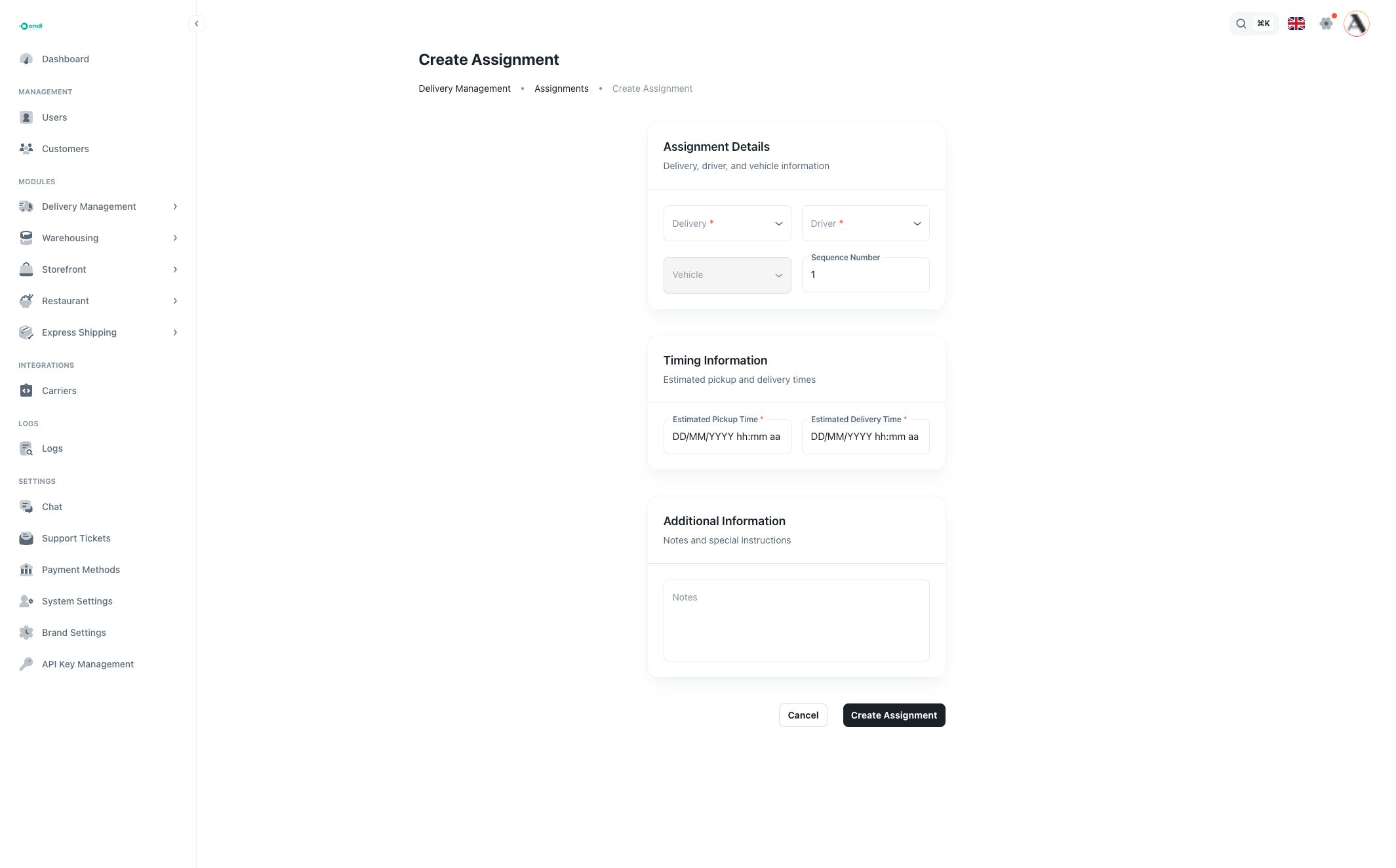
The form is grouped into assignment details, timing, and notes.
Assignment details
Delivery is the delivery that needs to be assigned. The selector shows pending deliveries only, because completed or cancelled deliveries should not receive a new active assignment.
Driver is the person who will execute the delivery. The selector searches active drivers whose operation status is available. When you select a driver, Ondi fills the Vehicle field from that driver's assigned vehicle when one exists.
Vehicle is shown for confirmation. In the tenant admin form it is filled from the selected driver and is not manually selected.
Sequence Number controls the delivery order for the driver's work list. Use 1 for the first stop, 2 for the next stop, and so on.
Timing information
Estimated Pickup Time is when the driver is expected to pick up the delivery.
Estimated Delivery Time is when the delivery is expected to be completed. It must be later than the pickup time.
For new assignments, pickup time cannot be earlier than the current time.
Additional information
Use Notes for special instructions, handoff details, access information, or internal context that helps the dispatcher or driver understand the assignment.
Edit or delete assignments
Use the row action menu to edit or delete an assignment.
Editing is available only while the assignment is still pending. Once the assignment has moved into driver execution, Ondi protects the record so historical dispatch and performance data remain consistent.
Deleting removes the assignment record after confirmation. Use delete only when the assignment was created by mistake. For normal operational changes, prefer updating the delivery or creating the correct operational follow-up so the audit trail remains clear.
Good practices
Review pending assignments regularly so deliveries do not wait without driver ownership.
Confirm that the selected driver is available before assigning work. A driver can appear unavailable if they are inactive, already busy, or not eligible for the current operation.
Use notes for exceptions, fragile packages, customer access rules, or any instruction that should not be lost between admin and dispatch teams.