Deliveries
Deliveries are the main operational records in Lastmile Delivery. A delivery stores the customer, pickup and dropoff locations, service, carrier type, package details, payment settings, status, shipment label, tracking link, events, and proof information.
Go to Delivery Management -> Deliveries.
This page documents the tenant admin delivery view. Dispatchers can also manage delivery work from the dispatcher view, where day-to-day operations may include more live assignment, monitoring, driver, and route actions.
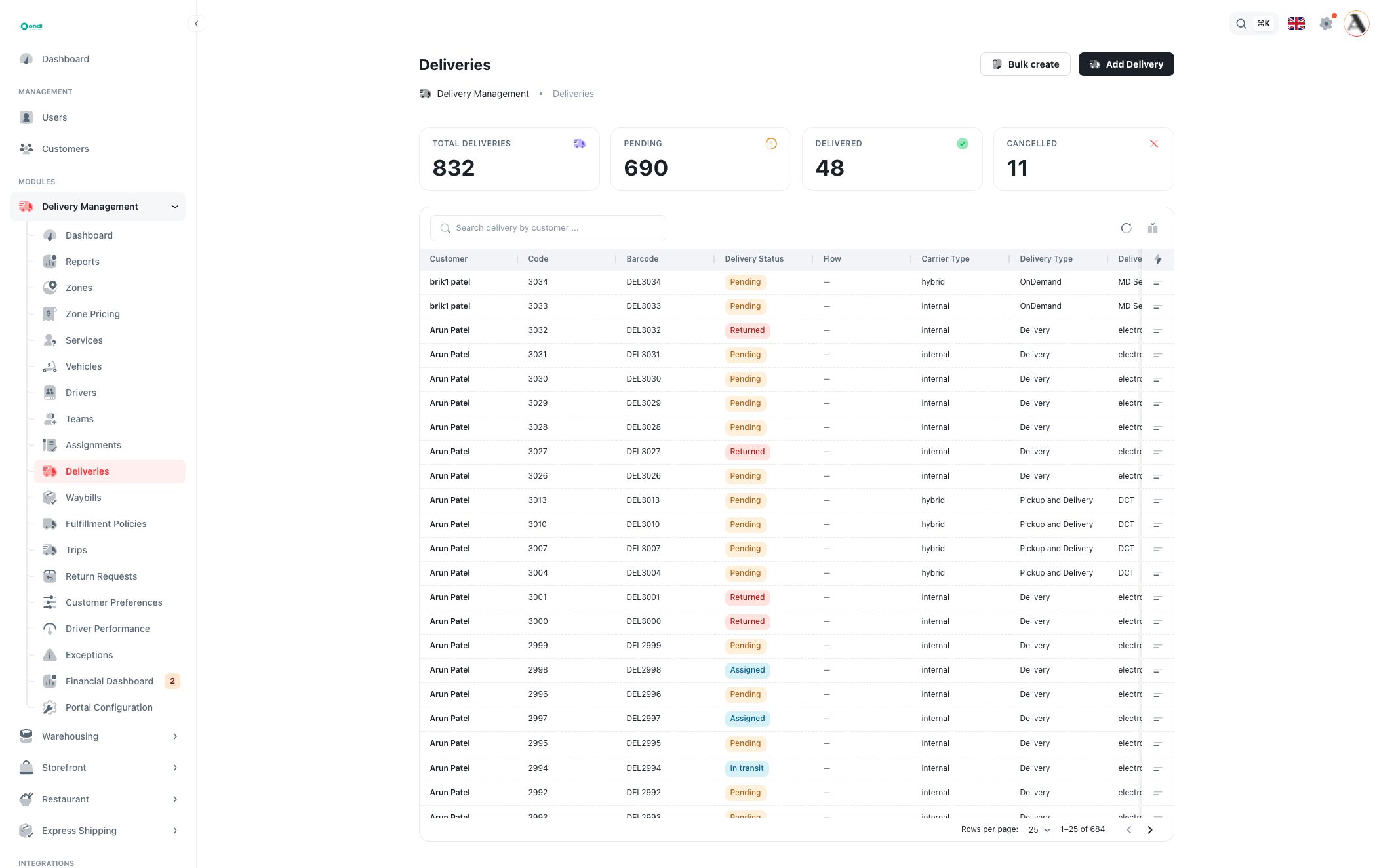
Delivery list
The top cards summarize delivery volume:
- Total Deliveries: all delivery records for the tenant.
- Pending: deliveries waiting for assignment or execution.
- Delivered: deliveries completed successfully.
- Cancelled: deliveries cancelled before completion.
Use the table to review delivery records:
- Customer: the customer or business user linked to the delivery.
- Code: the internal delivery code used in Ondi.
- Barcode: the barcode value used for scanning and labels.
- Delivery Status: the lifecycle status.
- Flow: replacement forward or replacement return when the delivery is part of a replacement workflow.
- Carrier Type: internal, hybrid, PRIME, or another carrier type depending on the service.
- Delivery Type: the workflow type, such as Delivery, Pickup, Pickup and Delivery, or OnDemand.
- Delivery Service: the service selected for pricing, promise, and operational rules.
- Payment Method: wallet, cash/COD, card, account, prepaid, or another configured method.
- Payment Status: pending, paid, failed, or refunded.
- Payer Type: sender or receiver.
- Delivery Fee: the fee calculated or entered for the delivery.
- Shipment: shipment-label action or document link when a label exists.
- Tracking: opens the tracking page for the delivery code.
- Created At: when the delivery was created.
Search finds deliveries by visible delivery data. Use column filters for customer, code, barcode, status, carrier type, delivery type, delivery service, payment method, payment status, payer type, fee, and creation date. Use the column control to show or hide fields.
Delivery statuses
The delivery status shows the current lifecycle stage:
- Draft is saved but not ready for normal execution.
- Pending is waiting for assignment or next operational action.
- Assigned has driver ownership.
- Picked Up means the package has been collected.
- In Transit means the package is moving toward the destination.
- Staged at Warehouse means the package is waiting in a warehouse stage before the next move.
- Delivered is complete.
- Cancelled is stopped before completion.
- Returned means the delivery ended through a return outcome.
Status behavior can depend on carrier type. Internal deliveries support manual status changes in the tenant admin list. External or hybrid carrier flows may rely on carrier events or related child deliveries.
Row actions
Open the row action menu to work with one delivery.
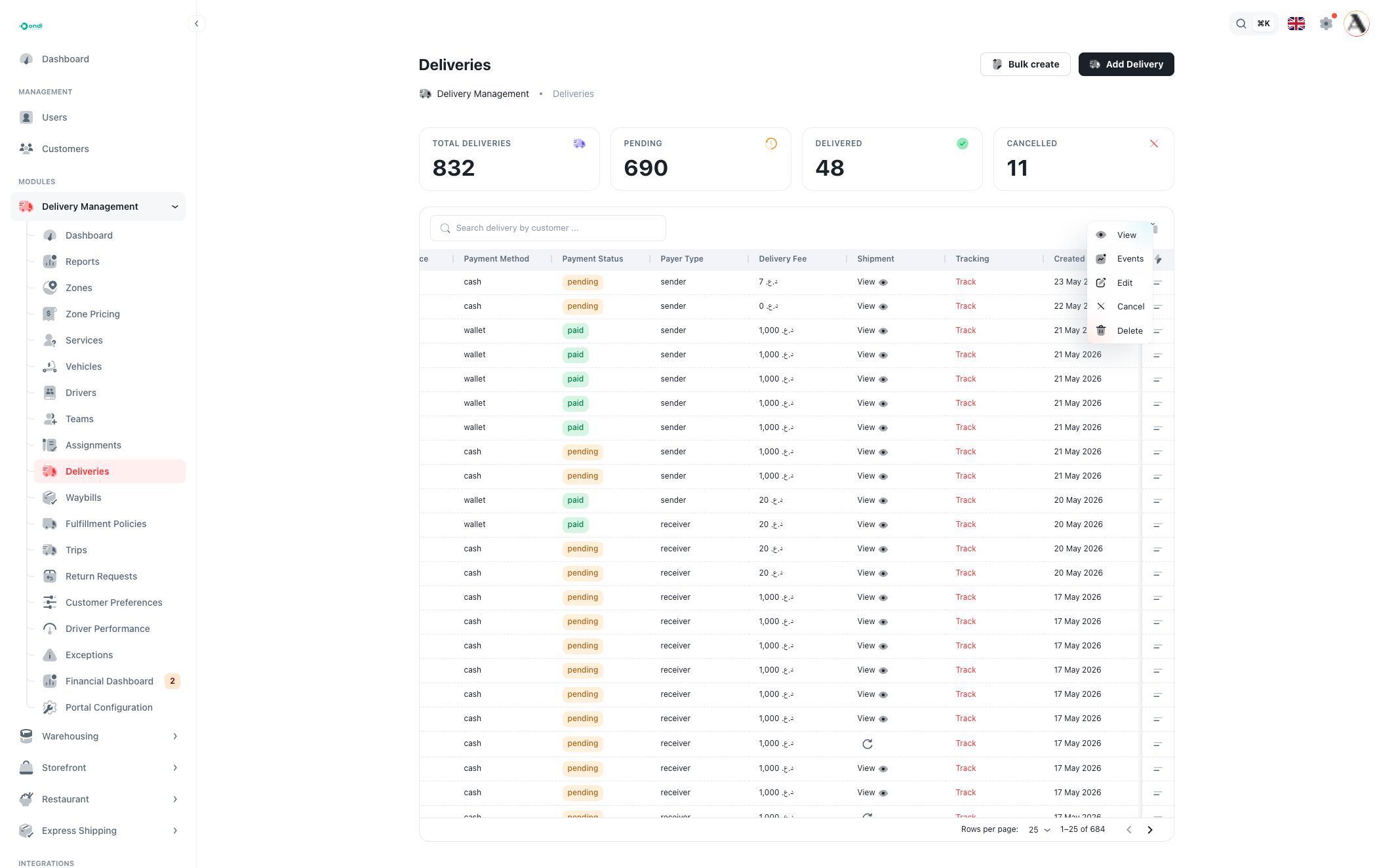
Available actions include:
- View: opens the delivery detail page.
- Events: opens the delivery event history panel, including status changes and actors.
- Edit: opens a full-width edit modal with the delivery form.
- Change Status: appears for internal carrier deliveries and lets you move the delivery to another lifecycle status.
- Cancel: cancels deliveries that are not already delivered or cancelled.
- Delete: removes the delivery after confirmation.
Use cancel or status change for real operational outcomes. Use delete only for incorrect test or duplicate records that should not remain in the tenant record.
Delivery detail page
Open View to inspect one delivery without editing it. The detail page combines operational and financial context in one place:
- delivery code, flow, and current status
- customer details and contact information
- assigned driver and vehicle, when available
- pickup and delivery locations, including map context
- warehouse staging or carrier information, when relevant
- status timeline and event history
- shipment label actions and downloads
- proof of delivery, photos, and signature when available
- package items and package labels
- payment method, payment status, payer, COD amount, and delivery fee
- related return or replacement deliveries
Use the detail page before changing status, creating a return, checking proof, or investigating a customer question.
Create or edit a delivery
Click Add Delivery to create a delivery. Use Edit from the row menu to update an existing delivery.
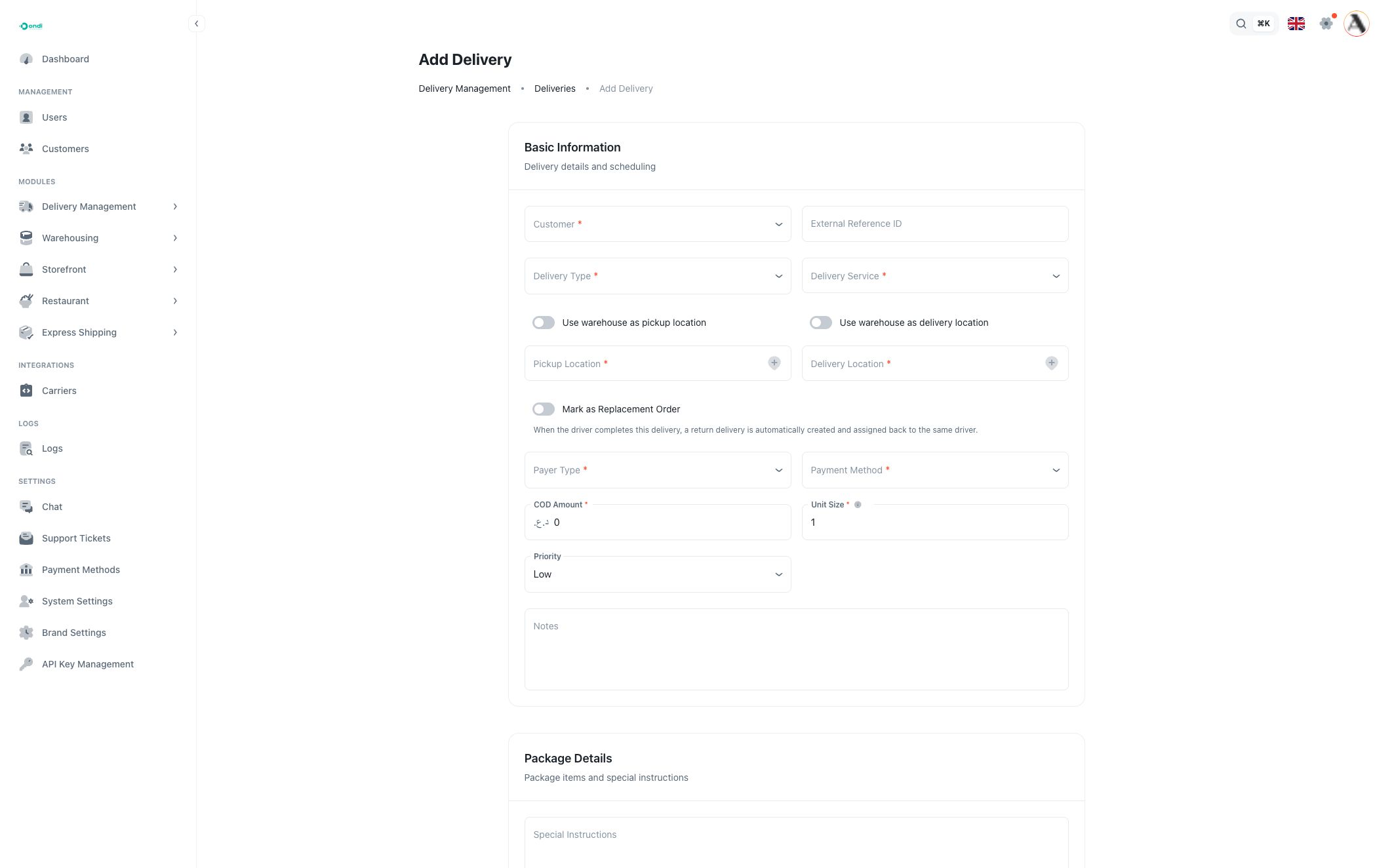
Basic information
Customer is required. It connects the delivery to the correct user, address book, wallet, and customer context.
External Reference ID is optional. Use it for store order numbers, marketplace references, ERP IDs, or customer order IDs.
Delivery Type is required and controls the workflow. Delivery, Pickup, Pickup and Delivery, and OnDemand may show different options.
Delivery Service is required. The service controls availability, pricing, service level, policy, and customer access. Services are configured in Delivery Services.
Pickup and delivery locations
Use Use Warehouse Pickup when the delivery starts from a warehouse. Otherwise select a customer pickup address.
Use Use Warehouse Delivery when the delivery ends at a warehouse. Otherwise select a customer delivery address.
The address selector can add a new address from the form when the customer does not already have the needed location.
For Pickup and Delivery workflows, Requires Warehouse Staging can add a staging warehouse. Use this when goods must be held or sorted in a warehouse between pickup and final delivery.
Payment and priority
Payer Type decides who pays for the delivery: sender or receiver. When receiver is selected, the customer can be treated as the receiver for payment handling.
Payment Method controls how the delivery fee or COD is handled. Cash/COD uses the COD amount field. Wallet uses the customer's wallet balance where enabled.
Unit Size is required and must be greater than zero. It affects price calculation and capacity planning.
Priority marks urgency: low, medium, high, or urgent. Use high and urgent only when the operation should treat the delivery as more time-sensitive.
Replacement delivery
On create, Is Replacement can mark the delivery as part of a replacement flow. Replacement workflows can create a forward delivery and a linked return delivery so the driver can complete the exchange in the correct order.
Package details
Use Special Instructions for handling instructions that should travel with the delivery.
Add package items when the delivery has item-level details. Each item can store name, quantity, description, weight, and dimensions. Accurate item data helps with labels, warehouse handoff, and issue investigation.
Price preview
When the service, locations, and unit size are available, Ondi can show a delivery price preview. If the preview cannot calculate a price, check that the service, zones, and location coordinates are valid.
Change status
For internal deliveries, use Change Status to move the delivery to another lifecycle state. The modal can ask for:
- target status
- driver, when moving into execution and no active assignment exists
- reason or notes
The available statuses exclude the current status. If the delivery has no active assignment and you choose an execution status such as assigned, picked up, in transit, or delivered, select an available active driver.
Events panel
Use Events to review the delivery audit trail. Events show status changes, operational actions, timestamps, and users or drivers involved. This is useful when checking who changed a delivery, when a driver action happened, or why a customer sees a certain tracking status.
Bulk create deliveries
Click Bulk create when you need to import many deliveries at once.
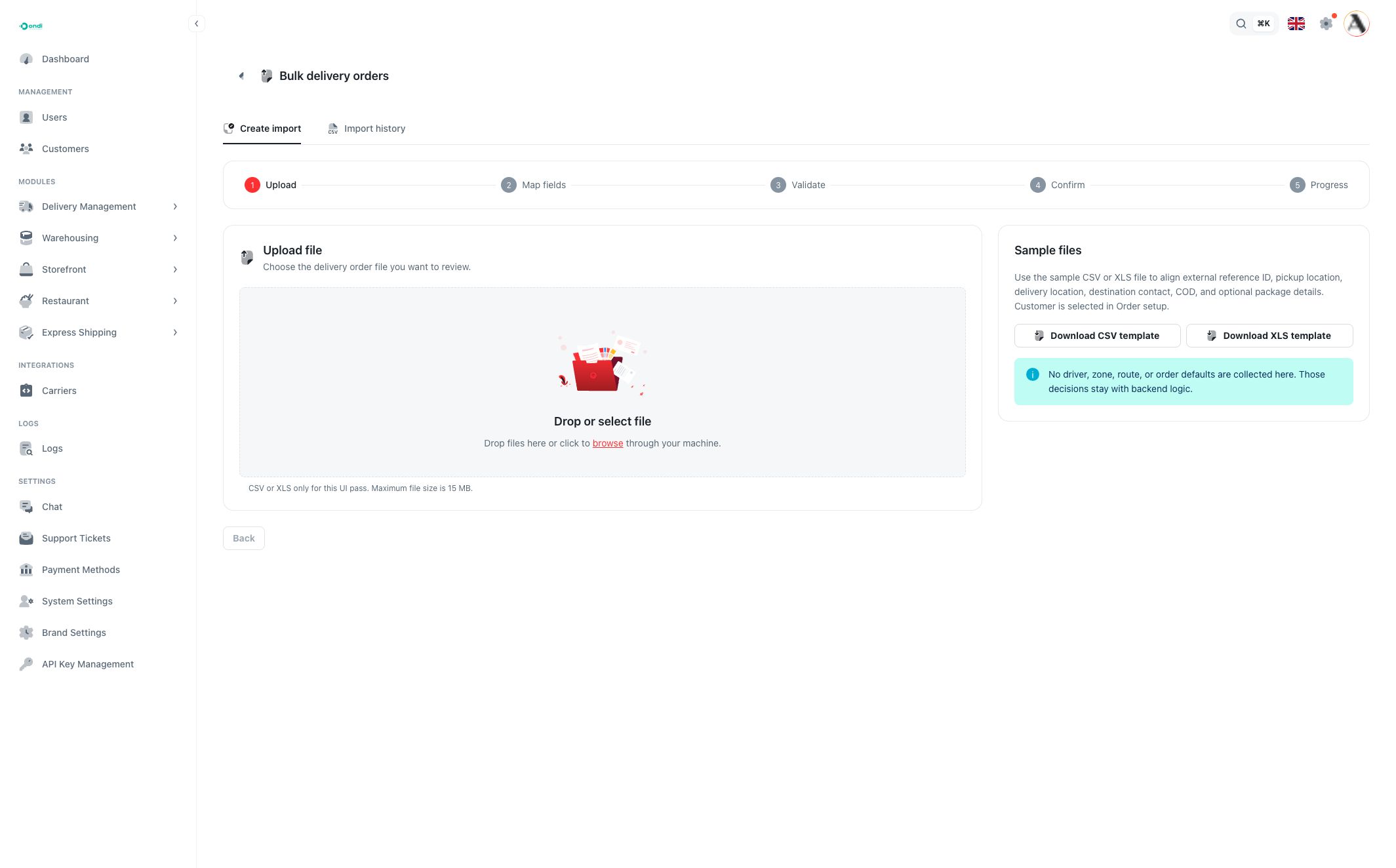
Use the bulk workflow for large order batches from stores, marketplaces, ERP exports, or customer spreadsheets. Download or use the expected template, upload the file, review validation results, and fix any rows that fail validation before creating the final deliveries.
Bulk creation is best for repeatable order imports. Use the single create form when you need to review pricing and delivery options one order at a time.
Shipment labels and tracking
The Shipment column shows label actions. If a PDF label exists, open it from the table or detail page. If label generation failed or is missing, use the retry action where available.
The Tracking link opens the public tracking page for the delivery code. Share this link with customers when they need to follow the delivery status.