Delivery Reports

Delivery Reports is the export builder for delivery data. It lets tenant admins choose a report catalog, filter the data, select fields, preview sample rows, and request CSV or XLSX exports.
Go to Delivery Management -> Reports.
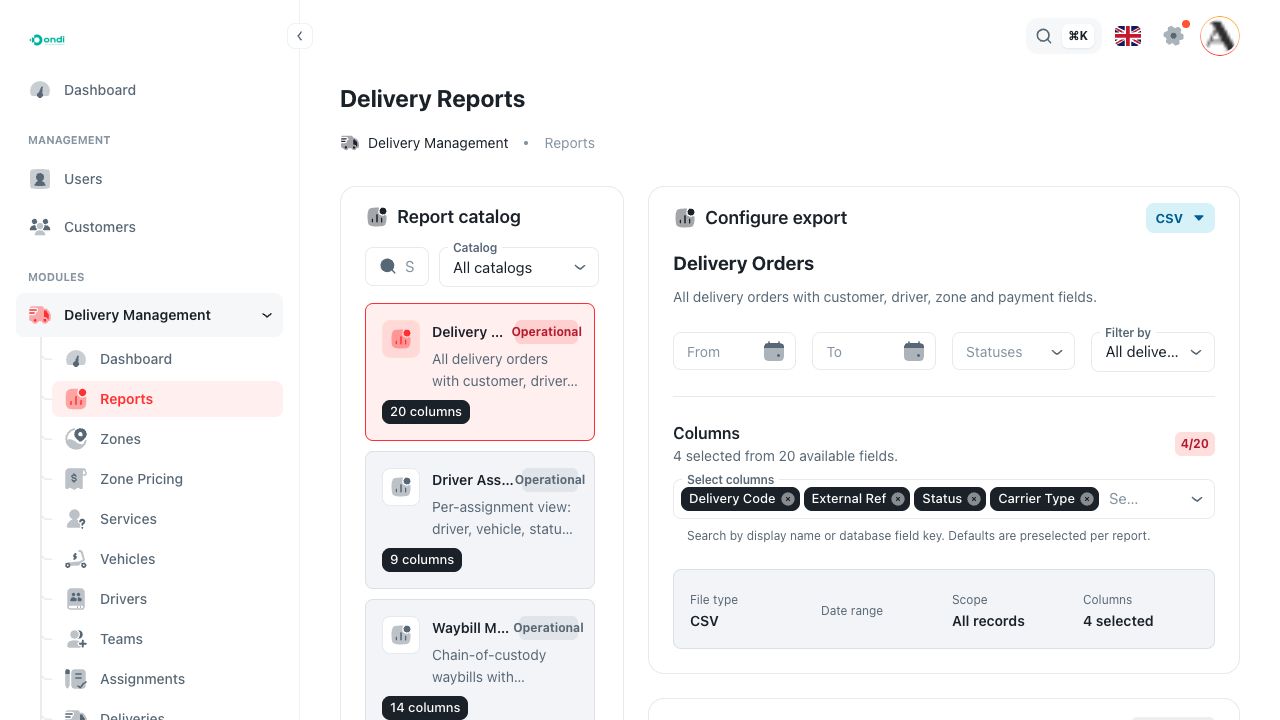
How reports work
Reports are built from catalogs. Each catalog defines the available fields, filters, statuses, scopes, and export formats for a specific delivery dataset.
The page has four working areas:
- Report catalog: choose which report to build.
- Configure export: set date range, status, scope, output format, fields, and relation output.
- Quick preview: see a sample table before requesting the export.
- Export history: download ready files or follow export job status.
You must choose a date range and at least one column before Ondi can preview or export a report. If you filter by a specific scope, such as selected zones or drivers, you must also choose the scope values.
Available report catalogs
The live tenant admin currently exposes these delivery catalogs:
- Delivery Orders: delivery orders with customer, driver, zone, and payment fields.
- Driver Assignments: per-assignment driver, vehicle, status, and timestamp data.
- Waybill Manifests: waybill chain-of-custody data, origin and destination details, and lifecycle timestamps.
- COD Collections: cash-on-delivery collection, remittance, and settlement data.
- Delivery Exceptions: delivery exceptions raised by drivers, with current status and resolution details.
The catalog list is loaded from the system, so a tenant may see more catalogs later if new report definitions are added.
Recommended workflow
- Choose the report catalog.
- Set From and To dates.
- Choose statuses if you do not want all statuses.
- Choose a scope only when you need a smaller dataset.
- Select the fields that should appear in the file.
- Review the quick preview.
- Request the export.
- Download the file from export history when it is ready.