Create Your Shop

Creating your shop is the first Store Front setup step. In Ondi, the shop record is called a market. The market controls the public store identity: name, slug, logo, directory category, storefront link, custom domain, publish state, and the high-level settings that decide whether the store is ready for customers.
Create this before categories, products, theme editing, ads, and publishing. Most Store Front admin pages depend on the market existing first.
What this step does
The market is the home base for the Store Front tenant admin. It gives the tenant a public shop identity and creates the structure that later pages use.
When the market exists, the tenant can open the storefront link, copy or share the shop URL, review setup readiness, connect a custom domain, open the theme editor, manage products and orders, and publish or unpublish the shop.
Customers will not care that the internal name is "market". They experience it as the online shop: the branded public place where they browse products and place orders.
In the admin portal
Go to Storefront -> Market.
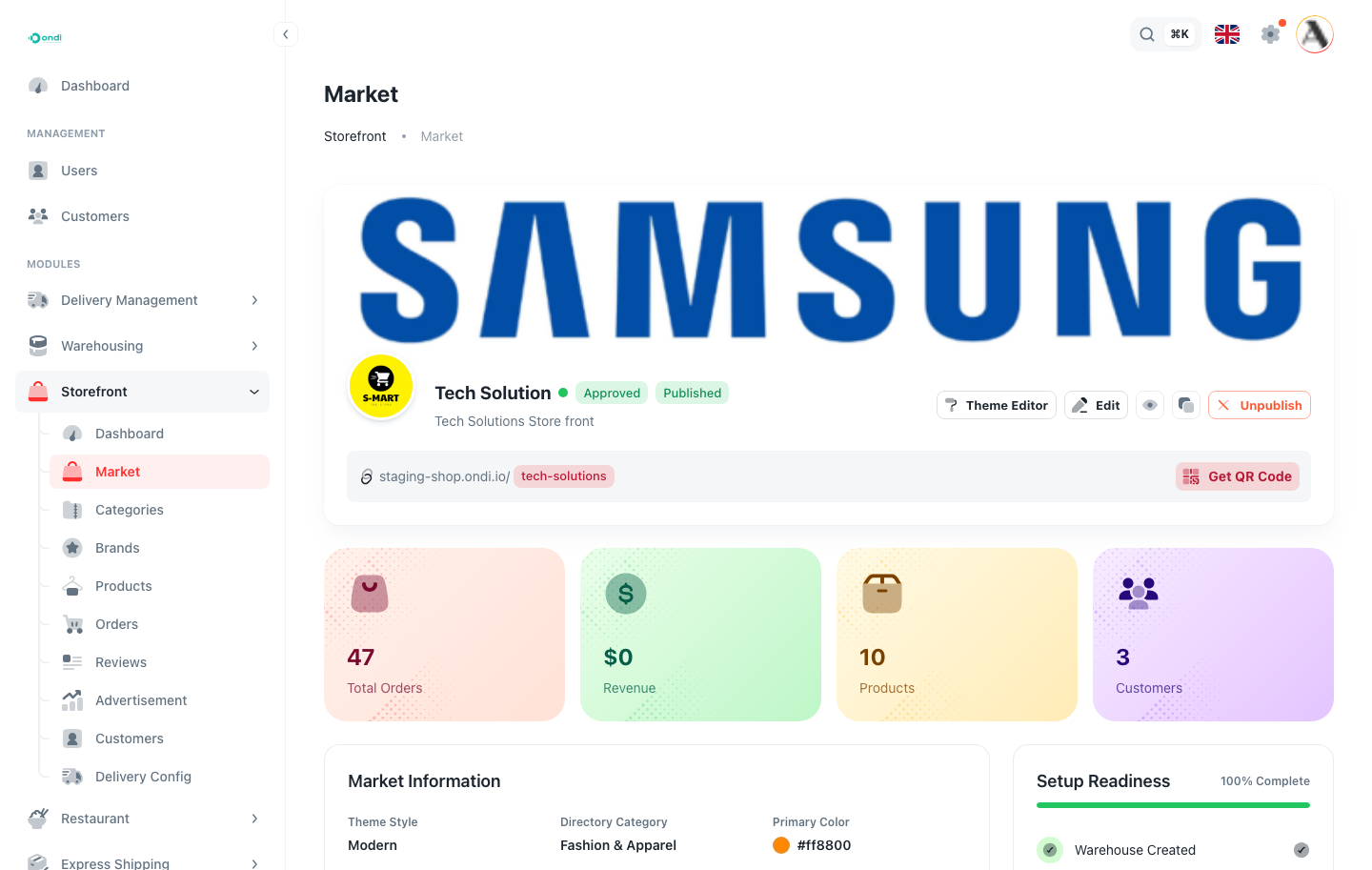
The Market page shows your current store status, publish status, storefront link, custom domain, setup readiness, recent activity, and shortcuts to edit the store, preview it, manage products, manage orders, copy the link, view analytics, and open the theme editor.
Configure the market
Use clear customer-facing values. The information on this page becomes part of the public shop and also helps admins understand whether the store is ready.
- Enter a clear store name that customers recognize.
- Choose a short slug. This becomes the store path, for example
staging-shop.ondi.io/tech-solutions. - Select the directory category that best describes your business.
- Upload the logo and confirm the primary brand color.
- Confirm whether cash on delivery and automatic delivery creation should be enabled.
- Save the market and review the setup readiness checklist.
The slug should be treated carefully. If customers already have the public shop link, changing the slug can break shared links or bookmarks. Decide early, keep it short, and avoid using temporary names in production.
What to decide early
- Store name and slug, because customers may bookmark or share the link.
- Logo and brand color, because they appear across the customer storefront.
- Custom domain, if the business wants customers to shop from its own URL.
- Delivery behavior, because it affects checkout and order fulfillment.
- Payment options, because the shop should not be published until checkout is tested.
Market status and publish status
The market has two important status ideas:
- Approval status tells the admin whether the market setup is draft, pending approval, approved, rejected, or otherwise not ready.
- Publish status tells the admin whether the public shop is published or unpublished.
A shop can be configured without being live. This is useful while the team is still adding products, checking stock, adjusting the theme, and testing checkout. Publish only after the catalog, delivery, payment, and order flow have been tested.
Custom domain
Use a custom domain when you want customers to shop from your own URL. Ondi shows the DNS records that should be added at your DNS provider. After the records propagate, verify and connect the domain from the Market page.
Customers trust a familiar domain more than a temporary setup URL. If the tenant has an existing brand domain, configure the custom domain before broad launch. If the business is still testing internally, the default store link is enough.
Where this appears in the storefront
The market setup affects the first impression customers have of the shop. The store name, logo, public link, domain, publish state, and theme entry point all come from this setup. If the market is unpublished, customers should not be able to use the shop as a live buying channel.
Before moving on
- The market exists and has the correct name.
- The slug is final enough to share with customers.
- Your logo and main brand color are set.
- A warehouse exists if you plan to sell stock-managed physical goods.
- Payment and delivery configuration are planned before publishing.