Bin Locations
The Bin Locations module enables administrators to create and manage specific storage areas within warehouses—such as shelves, bins, aisles, racks, or zones. Each location is uniquely identified by a location code and linked to a warehouse, providing precise control over where inventory is stored and retrieved during warehouse operations.
What are Bin Locations?
A bin location represents a defined physical storage area within a warehouse where inventory items are placed. Each bin location includes key attributes such as location type, capacity, security level, and operational status.
Bin locations support:
- Precise inventory placement: Direct items to specific storage areas during receiving operations.
- Efficient picking: Guide staff to exact locations when fulfilling orders.
- Space optimization: Track capacity and utilization across storage areas.
- Security control: Restrict access to sensitive or high-value storage zones.
- Operational flexibility: Organize storage areas by type, zone, or function for improved workflow.
Proper bin location configuration minimizes search time, prevents misplacement, and ensures accurate inventory tracking across warehouse processes.
Bin Location List
The Bin Location List provides a comprehensive view of all storage locations configured across your warehouses.
Use the list to monitor location status, review capacity, and manage warehouse storage organization. The interface includes:
- Search functionality: Quickly locate bin locations by location code, warehouse name, or type.
- Filtering options: Filter locations by warehouse, location type (Shelf, Bin, Rack, Zone, Aisle), security level, or status (Active/Inactive).
- Sorting capabilities: Sort by warehouse, location code, type, capacity, or status.
- Quick actions: Access location details, edit configurations, or change status directly from the list.
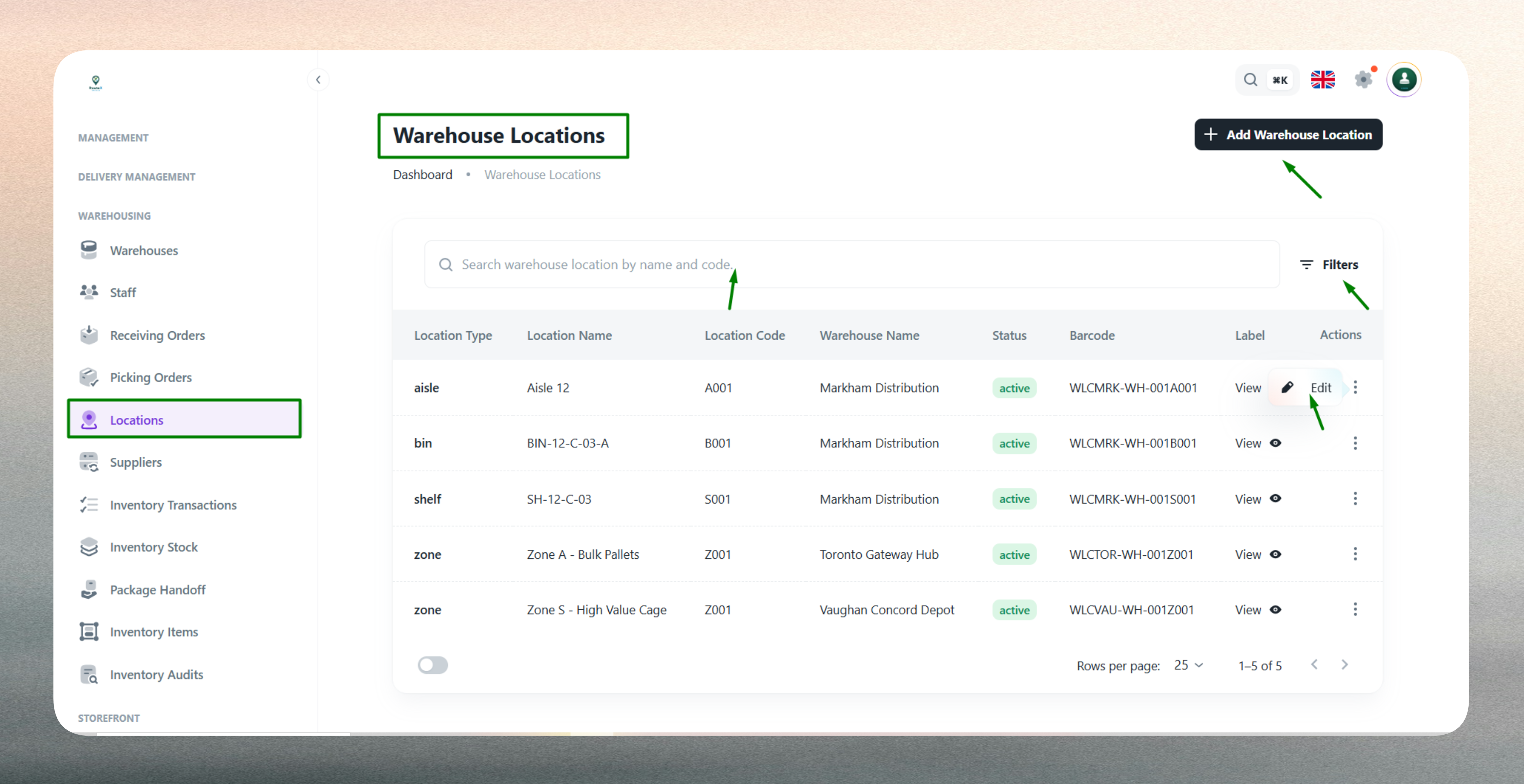
The list displays key information including warehouse name, location code, location type, capacity, security level, and current status for easy reference and operational oversight.
Create a New Bin Location
Creating a bin location requires defining its warehouse association, organizational attributes, and operational constraints to ensure accurate inventory placement and efficient storage management.
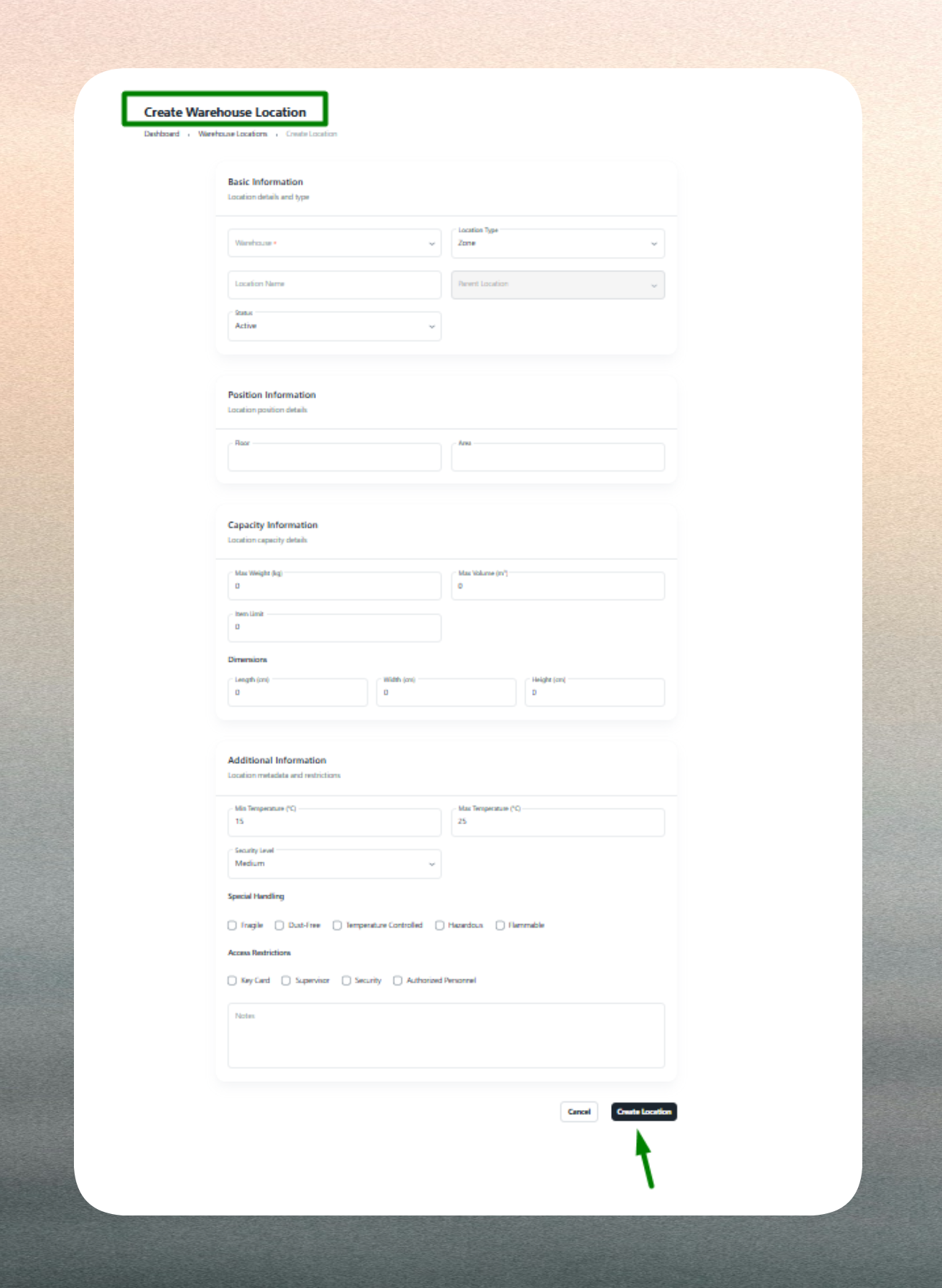
Warehouse Association
Select the warehouse in which this bin location exists. The warehouse association links the location to a specific facility and ensures proper item tracking, capacity reporting, and operational routing across your warehouse network.
Location Identification
Provide a unique location code that identifies the storage area (e.g., BIN-A12, SHELF-05, or RACK-C3-L2). The location code must be unique within the selected warehouse and should follow your organization's naming conventions for consistency across facilities.
Choose the location type—such as Shelf, Bin, Rack, Zone, or Aisle—to categorize and organize warehouse storage areas for better space management and operational clarity.
Capacity & Security
Define the maximum storage capacity (load, volume, or quantity) the location can hold to optimize space usage, maintain safety standards, and prevent overloading. Capacity is optional but recommended for locations with physical or weight constraints.
Set the security level to control access to the location. Options such as General Access, Restricted, or High Security ensure compliance with storage regulations and protect sensitive or high-value inventory from unauthorized access.
Status & Validation
Set the bin location's operational status (Active or Inactive). Active locations are available for inventory placement and picking operations, while Inactive status excludes them from selection during maintenance, reconfiguration, or temporary closures.
The system validates all required fields and enforces business rules. Warehouse, location type, and location code are mandatory. Location codes must be unique within each warehouse, and capacity values (if provided) must be numeric. Any validation errors are highlighted for correction before submission.
Edit an Existing Bin Location
Bin location profiles can be updated at any time to reflect changes in warehouse organization, capacity, or operational requirements.
Common updates include:
- Location code changes: Update naming conventions for consistency or reorganization (use caution as this may affect integrations and reports).
- Capacity adjustments: Modify storage limits to reflect physical changes or operational policies.
- Security level updates: Adjust access restrictions as inventory sensitivity or compliance requirements change.
- Status changes: Toggle between Active and Inactive status for maintenance, reconfiguration, or temporary closures.
- Type reclassification: Change location type to align with warehouse layout changes or storage strategy updates.
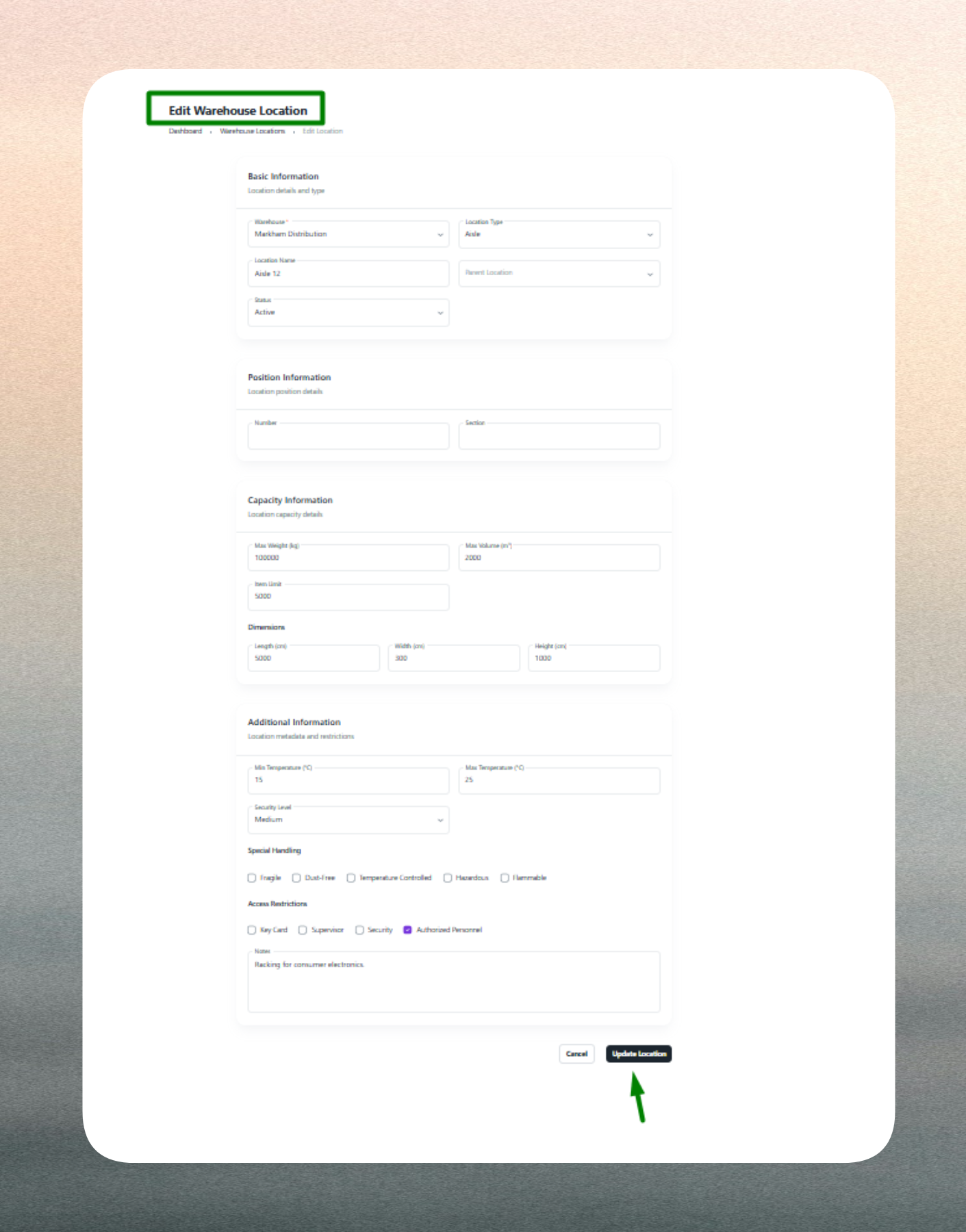
Editing bin locations ensures accurate inventory placement, maintains compliance with warehouse policies, and supports dynamic space management. The system retains historical data for reporting and auditing purposes.
Keep bin location details current—especially capacity, security level, and status—to maintain accurate inventory placement and prevent operational errors during receiving and picking activities.
Use consistent naming conventions (e.g., WH1-AISLE3-BIN12 or A3-R2-S5) across warehouses for easier management, reporting, and staff training. Standardized codes improve efficiency and reduce placement errors.
Mark bin locations as Inactive instead of deleting them if they are temporarily unavailable or under reorganization. This preserves historical inventory data and allows for easy reactivation when the location returns to service.